Friday, November 23, 2012

E-Business Suite R12 integration with Oracle Identity Management 11g

After successful implementations of Oracle SSO 10g with Oracle E-Business Suite 11i and R12, I have now completed an installation and implementation of the Oracle Identity Management and Access Management 11g. This is the Single Sign-On solution of Oracle.
We used the latest version of Oracle Identity Management( Idm) solution, which is currently certified with E-Business Suite R12. This is version IdM 11gR1, to be more precise 11.1.1.5.
Oracle Access Manager (OAM) provides the access management service for authentication and authorization and replaces the Oracle 10g OSSO service.
The current certified implementation requires an Oracle Internet Directory (OID). We have setup the synchronizing process of users from MS Active Directory to Oracle OID. Furthermore, we have setup Oracle provisioning from OID to EBS to create EBS users automatically.
We completed the installation with Kerberos authentication.  With this Windows Native Authentication (WNA) solution,  we created a ‘zero Single Sign-on’ solution. The user is authenticated by Kerberos tickets and user logon into EBS R12 is based on the network credentials.  Users do not need to enter the EBS username and password anymore, because they are already authenticated on the network. A very secure solution and saves a lot on user administration.
Overview of products installed:
- Oracle Identity Management  11g (11.1.1.5)
- Oracle Access Manager 11g (11.1.1.5)
- Oracle EBS Access Gate 11g (1.1.1)
- Oracle Webserver 11g
- Oracle WebGate 11g (11.1.1.5)
- Oracle WebLogic Server (10.3.5)

Tuesday, July 10, 2012

Certified Oracle IT Architecture Specialist!

Tonight I received an e-mail from PearsonVue that my score report for Exam 1Z1-574 was published. I didn't expect it this soon, since the beta period ended on May 26, if I remember well.
I was so happy to see that I have passed the exam!
Now it is official: I am Oracle IT Architecture Certified Specialist!

Thursday, March 29, 2012

Collaborate Dutch Preview Event

‘COLLABORATE 12: Technology and Applications Forum for the Oracle Community’ is de grootste Oracle gebruikersgroep conferentie ter wereld en wordt jaarlijks georganiseerd in de Verenigde Staten. Het is hét evenement om bij te zijn wanneer je geïnteresseerd bent niet alleen in Oracle Applications (E-Business Suite, JD Edwards, Siebel, etc.) maar ook in Oracle Technologie in het algemeen, van ontwikkeling tot beheer. Duidelijke aanwezigheid van Oracle geeft ook aan dat Oracle zelf veel waarde hecht aan deze conferentie. Ook dit jaar zal een aantal Nederlandse Oracle experts een presentatie geven op deze conferentie: Roel Hartman (Logica), Alex Nuijten (AMIS), Arian Stijf (Arven) en Arnoud Roth (Inter Access). Aangezien niet iedereen naar Las Vegas kan om deze conferentie bij te wonen, wordt er door Inter Access een Dutch Preview Event georganiseerd op woensdag 18 april vanaf 17 uur op het kantoor van Inter Access te Hilversum, waar alle presentaties van deze experts zullen worden getoond. Van Application Development, E-Business Suite Security, SOA tot Oracle Fusion Applications, de onderwerpen zijn zo divers dat je zeker een interessante avond zult beleven.

Nodig gerust geïnteresseerden uit jouw netwerk uit om mee te komen! 

Wil je deelnemen aan dit event? stuur een mail naar info@interaccess.nl.
Kijk ook op LinkedIn en geef aan dat je komt!

Hieronder het programma van sprekers en presentaties:

Alex Nuijten, AMIS

Solving Puzzles with SQL: Cheating when playing the game SET
Set is a card game which is fun to play while exercising your mind. In this session you will learn about the SET game, as well as how you can leverage SQL to solve it really quickly.
Learn advanced features of SQL, such as Subquery Factoring and ANSI join syntax while we’re cheating in the game of SET.

Who’s Afraid of Analytic Functions
“I never had the need for Analytic Functions”, is one of the phrases that is heard quite often. Maybe that’s true, maybe it isn’t. Recognizing the need for a particular feature can only occur when you have enough exposure to the feature. In this presentation a number of real life examples will be covered which will show the power of Analytic Functions and the ease of solving the challenge at hand.
You can learn the syntax from the Oracle Documentation, but you will learn to recognize “the need for them” by real life examples.

Database Development: SQL Holmes – The Case of the Missing Performance
During this presentation, a case study is unfolded to reveal the true cause of a slow performing query. Did the database just “have a bad day”? Was the evil DBA to blame? The PL/SQL developer who didn’t get enough coffee? Or was it the application sending the “wrong” query in the first place?
In this classic “whodunnit” you will take a tour past the crime scene. Investigate the query, use the tools of the trade and collect all the relevant information. Follow the trail to uncover the truth and nothing but the truth…


Roel Hartman, Logica

5 Cool Things You Can Do With HTML5
There is a buzz going around about HTML5. What is it exactly? And can we use it now? What are the benefits in an APEX environment?
This presentation will answer these questions and contain some nice demo’s using the new HTML5 features.

APEX Boot Camp: Striving for Perfection: The Ultimate APEX Architecture
APEX supports a flexible architecture. That means that there are multiple ways of solving problems like: separation of data and logic, security issues, re-use, including javascript and CSS, etc. etc.
In this session I’ll give the pro’s and cons of each available option. As this is aimed to be an interactive session, the attendees are encouraged to put forward their own ideas – and concerns. So, maybe, in the end, we’ll reach the “Ultimate APEX Application Architecture”!

Done in 60 Seconds – Creating Web 2.0 Applications Made Easy
This is a two-part session. Dynamic Actions is the most striking new feature of APEX 4. In this session you will learn how to using this new feature will speed up the development of your Web 2.0 enabled APEX applications tremendously.
And of course the main part of this presentation will be live demo

Arian Stijf, Arven

Securing the E-Business Suite. A Layered Approach
In this presentation we look at the features available on different levels of the technology stack, from the User Management in eBS down to the OS and network level. In this presentation we will present you with an overview of features available to secure your e-Business Suite. We discuss a holistic approach to securing your suite, by showing you the interaction between different security features. After the presentation you will be able to achieve the required level of security throughout the entire tech stack.

From Workflow to BPEL
In the (near) future Workflow will be replaced by BPEL. In this presentation we show how customers can prepare for the transition to BPEL. We look at the differences in technology and structure. An overview of the SOA architecture is given. We show how workflows can be 're-designed' in BPEL. There is special attention for developing new workflows that are easier to transfer to BPEL. Hands-on a number of workflows are redesigned in BPEL


Arnoud Roth, Inter Access

Oracle Fusion Applications Architecture Fundamentals
Oracle Fusion Applications offers the new standard for Business. It also offers a new standard for applications technology and applications architecture. For anyone interested in Oracle Fusion Applications, this is a fundamentals session to explain the technical architectural elements, component interaction and major technology features of Oracle’s newest enterprise application: Oracle Fusion Applications.

Monday, April 11, 2011

IT Strategies from Oracle

Having an Enterprise Architecture is essential for successfully rolling out an IT strategy for almost any company. Enterprise Architecture is all about defining what your business wants to do from the perspective of why you want to do it, and translating it into how to do it. There are many frameworks available that help you define an architecture, be it Business, Data, Application or Technology related. For the latter, Oracle has developed a technology architecture, called the Oracle Reference Architecture (ORA). The ORA is part of the IT Strategies from Oracle.

itso-diagram

The IT Strategies from Oracle give you a whole library of whitepapers, not only to develop a Reference Architecture for your own, by adapting the ORA to your needs, but it also focuses on the surrounding Enterprise Technology Strategies and Enterprise Solution Designs. In other words, ITSO covers both the horizontal technology perspectives (SOA, BPM, EDA, etc.), but also the vertical business perspectives (Utilities, Government, etc.).

Now, in case you think that this is all about Oracle Technology products, you might be surprised: the whole ITSO / Oracle Reference Architecture is Vendor-Neutral. It is only scoped to Oracle's product portfolio. Now, one might ask themselves: what technology product area's doesn't Oracle have products for, so that shouldn't be too much of an issue as far as completeness is concerned.

ITSO can help you organizing complex product landscapes, by means of a holistic approach to technology adoption. By covering the technology as a whole, you can reduce risk and become more in control of your IT solutions.

The ITSO, and, being part of it, the Oracle Reference Architecture is not an Architecture Framework. For this, many solutions are already available, of which TOGAF and Oracle's Enterprise Architecture Framework (OEAF) are good examples. The ORA can be perfectly integrated in any of the currently available frameworks.

If you are interested in the ITSO, please visit www.oracle.com/goto/itstrategies, you will find a great deal of information there:

Oracle Reference Architectures
These cover
  • Application Infrastructure Foundation,
  • Service Orientation,
  • Service-Oriented Integration,
  • Software Engineering,
  • Security,
  • Management and Monitoring

Enterprise Technology Strategies for Service-Oriented Architecture
Practitioner Guides
  • SOA Foundation
  • Creating an SOA Roadmap,
  • Frameworks for Governance,
  • Identifying Services,
  • Determining ROI,
  • Software Engineering

Enterprise Technology Strategies for Business Process Management
These documents contain
  • BPM Foundation
  • BPM Infrastructure
  • Practitioner Guide on Creating a BPM Roadmap
I am sure you will find something useful in this library for your enterprise information technology strategy.
Be sure to check it out!

Friday, February 25, 2011

Finally took the step: Twitter

I have just tweeted for the very first time in my life. Awkward feeling, especially since I am not altogether convinced whether twitter really suits me. On the other hand, blogging takes a lot of time which I can spare really, so maybe twitter will fill the gap...
My account, for anyone interested in following me: OraClever (I have no followers yet, so please...?:-)

Monday, January 31, 2011

TOGAF 9 Certified

In the week before Christmas, I attended a TOGAF 9 course (http://www.the-unit.nl/). This was particularly interesting, since I have certain architectural responsibilities at the company I work for. TOGAF is becoming more and more a world leading framework for developing architectures.
It was a five-day training, and it has been a most interesting week. The trainer (Rienk de Kok) was very knowledgeable at the subject and clearly had a lot of working experience. He led us through the wondrous world of developing architectures, and at the end of the course week, we had to take the first exam (TOGAF Foundation). We all passed the exam, which gave us the key to the next exam: TOGAF Certified. In order to pass this exam, you have not only to know the terms and put them in the right place in the framework (Foundation exam), but also need to know how to apply the framework in a series of 8 cases that are examined in the Certified exam. I must say, it was a difficult exam. Not only because the cases are quite extensive (lots of reading), but the answers to the question that comes with each case each are differently awarded. In other words: 3 of the 4 answers are more or less correct in one way or another. There is one best answer, a second best answer and a least good answer. Beside these 3 answers there is one distractor (if you can call it a distractor... sometimes it is quite hard to tell...).
Today I passed the TOGAF Certified exam, which makes me TOGAF 9 Certified.

5 stars for the training and the trainer!
(and for me, passing both exams at the first attempt :-))

Friday, November 12, 2010

It has been some time...

...since I last posted here... It has been a busy time. Hopefully I will get back to blogging shortly.
Just be a little more patient...

Thursday, June 10, 2010

Oracle Contest: Are You The Smartest 2010 - WINNER!!!

In the past half year Oracle BeNeLux organized a contest, called Are You The Smartest. This is a contest for Oracle Partners, and covered 7 evening sessions.
The idea behind this contest is to get Oracle Partner consultants up to speed with new products and strategies on the technology level. Seven evenings packed with information on the following topics:

 
  • Oracle Technology Overview
  • Layering your Enterprise Security
  • Database 11g r2 New Features
  • Enterprise 2.0 and moreLarge Databases, Partitioning, Exadata, OWB-ODI, Golden GateOracle
  • Enterprise Manager from OS to Application
  • Application Grid 11g with WLS, Coherence, Tuxedo, JRockit, RealTime, ...

 
Every topic was followed by an exam, to be taken right before the next session.
These were no easy exams, I can tell you. 20 questions in half an hour. Half of the questions were taken directly from the session content, the other half from other documentation and information on the web. Scoring is quite particular: every correct answer is a point, every wrong answer is a negative... So in theory, a negative score can be achieved... Hence, study was necessary.

 
My company (Inter Access B.V.) subscribed with approximately 25 consultants, so we were a "big" partner. One of us was to be rewarded the grand prize: An All-inclusive trip to San Francisco and Las Vegas, including a visit to Oracle Headquarters in Redwood Shores.

 
Three weeks ago, I received the good news: I am one of the winners of the grand prize! Yesterday evening I was awarded the prize, and next week I will be flying to San Francisco for the trip.

 
For a complete coverage of the trip, please visit http://ayts2010.blogspot.com/. Stay Tuned!

Thursday, January 28, 2010

ACFS: NOT for Database Files!

ASM Cluster File System was introduced with Grid Infrastructure along with Oracle 11g Release 2. To be honest, I assumed this file system layer was also provided to store database files, a kind of improvement, because ASM, being a black box to many, 'hided' these database files from sight on the Operating System. Which - on the other side - was kind of neat, because chances were lowered these files to be accidentally removed by non-knowledgable users.

It is technically possible to store your database files on ACFS, no question about that. I already deployed a number of test databases on ACFS. However, the Oracle 11g Release 2 Storage Administrator's Guide, Chapter 5 states:

  • Oracle ASM is the preferred storage manager for all database files. It has been specifically designed and optimized to provide the best performance for database file types.

  • Oracle ACFS is the preferred file manager for non-database files. It is optimized for general purpose files.

  • Oracle ACFS does not support any file that can be directly stored in Oracle ASM.

    Not supported means Oracle Support Services will not take calls and development will not fix bugs associated with storing unsupported file types in Oracle ACFS.

Especially that last sentence says it all: If you run into trouble with your database stored on ACFS, you will not be assisted by Oracle Support.

Here is the list of file types that are NOT supported to be stored on ACFS:

Control files
Data files
Redo log files
Archive log files
Temporary files
Data file backup pieces
Data file incremental backup pieces
Archive log backup piece
Data file copy
Persistent initialization parameter file (SPFILE)
Flashback logs
Change tracking file
Data Pump dumpset
Automatically generated control file backup
Cross-platform transportable data files
Flash file
Oracle ASM Persistent initialization parameter file (SPFILE)
backup
Oracle Cluster Registry file


Be aware of this when you are designing your Grid Infrastructure!

Tuesday, January 19, 2010

UKOUG RAC & HA SIG Meeting Agenda Available

On February 10 I will present at the UKOUG RAC & HA SIG meeting at Oracle in Reading.
The agenda has been published and will contain the following interesting sessions:

10:00
Welcome and Introduction

10:15
Support Roundup - Phil Davies, Oracle

10:35
Recovery of very Large Database in shortest time possible - Arnoud Roth, Inter Access

11:45
ASM Split Brain - Problem Description - Pavel Rabel, DSP Managed Services

12:15
Application Consolidation Experiences on a 3-node RAC Cluster - Martin Bach, Markit Group Ltd.

14:00
Using RAC and Grid for Database Consolidation - Panel Discussion

14:45
Rolling Database Upgrade, a Real World Experience - Thomas Ramanauskas, ekc

15:15
Oracle RAC on Cisco UCS hardware, boxes to blades by brunch - Dev Nayak, DSP Managed Services and Carl Bradshaw, Cisco

16:00
Stretched RAC Cluster with 11gR2, David Burnham, Ioko365

16:30
Close


Looks to be a promising day!
I am really looking forward being there.

Thursday, December 24, 2009

Happy Holidays!

Wishing everybody out there a very merry Christmas and a prosperous 2010, full of learning and sharing!
Keep in Touch!
Arnoud

Tuesday, December 22, 2009

Presenting @ UKOUG RAC & HA SIG meeting on Feb 10

On February 10, 2010, the UKOUG RAC & HA SIG will organize it's half-yearly SIG meeting.

I am very pleased to tell you that I have been invited to join this meeting and present about the recovery method I have been exploring lately (see this post, with all its referring posts).

The agenda is not yet fully confirmed, but there will be
  • a forum discussion on the topic of using Grid and/or Real Applications Cluster for consolidation;
  • Martin Bach (Oracle 10g Certified Master) will do a presentation.
  • My presentation - Lightning fast recovery of (physically) corrupted databases without the need to restore the backup - or - To Restore Or Not?
Other presentations / sessions have to be confirmed yet, but it all seems quite promising (if I may speak - partially - for myself:-).
Once the program is confirmed completely, I will post about it again.

The event will take place on Feb. 10 at the Customer Visitor Center at Oracle Thames Valley Park in Reading, UK.

Looking forward to an incredible day of learning and sharing.

E-Business Suite Release 12.1.2 available

Having been ill for a couple of days, I missed Steven Chan's announcement for Oracle E-Business Suite Release 12.1.2.
In an earlier post I already elaborated on the new Technology Features of this release.
I will get my 12.1.1 environment started up this weekend and see whether I can upgrade to 12.1.2 according to Metalink Note 845809.1.

Nice new feature: Oracle Database 11gR2 is certified with R12.1.2 (or should it be the other way around?)!

I will keep you updated on my progress.

Wednesday, December 9, 2009

E-Business Suite R12: Shared Application Tier File System

In Oracle E-Business Suite Release 12, one of the eye-catching new features was the Instance Home, or $INST_TOP. The result of this Instance Home is that you can now share the APPL_TOP between multiple installations of Oracle E-Business Suite.
I have seen a number of articles and discussions on the Internet discussing the reasons why one would want to share the APPL_TOP between E-Business Suites.

Why share?
Personally, I didn't see any reason why I would want this, other than to see it work and be able to use the feature, when time would come that I would need it.
I cannot remember where anymore, but I saw a reason lately that actually made sense to me:
As a DBA, it could be of use when I would want to replay issues that have been reported to me, being sure that I would be using the exact same APPL_TOP. I could set up a separate E-Business Suite, sharing the APPL_TOP, but having my own database. Now I can play around with my own E-Business Suite, without making changes to the production data, but I am still using the very same code as in the production environment. To make sure I do not break anything, I could even mount the APPL_TOP read only.
Recently I found another reason why it could be interesting to share the APPL_TOP: When your production environment consists of multiple E-Business Suites. I heard about Oracle's recommendations to separate Advanced Supply Chain Planning from your OLTP E-Business Suite environment. You would have to maintain two E-Business Suites, and I can see a couple of reasons why you would want to have identical code versions on each of them. In order to keep the two (or any number of) environments synchronous, you might want to implement the shared APPL_TOP.

Share what? APPL_TOP vs. Application Tier File System
By the way, can "shared APPL_TOP" also be read as "Shared Application Tier File System"? I have taken up the habit of asking whether APPL_TOP means Application Tier File System, or it just reflects the $APPL_TOP directory with all its subdirectories. It happens to be that the two are not the same, even though many of us use the two simultaneously.
In my opinion (but that may be because my experience goes back to the days these technologies were introduced), the APPL_TOP is just the ($)APPL_TOP: the top level directory that contains the product tops (/whatever_directory/apps/apps_st/appl).
The Application Tier File System is more than just the APPL_TOP. It contains the whole set of code that makes the Application Tier, i.e. the APPL_TOP, COMMON_TOP, but also the 10.1.2 and 10.1.3 ORACLE_HOMEs that reside under
/whatever_directory/apps/tech_st. To conclude: The Application Tier File System is everything that resides under /whatever_directory/apps. That is a whole lot more.
But hang on? The question now is what Oracle means by stating that the APPL_TOP can be shared among multiple E-Business Suite environments. Do they mean just the APPL_TOP, or the Application Tier File System?
The official answer can be found in Metalink Note 384248.1, Appendix B where you can read that it is possible to share the complete Application Tier File System among multiple unshared E-Business Suite Databases.

Wednesday, November 4, 2009

"...Coolest Recovery Demo Ever..."

Yesterday, I got the chance to perform a presentation at the Dutch Oracle User Group (OGh) DBA day about a topic that I have blogged about a couple of days ago: Database Crash Recovery : To Restore Or Not Restore.

I proved my "theory" with a live demo. In VMware I crashed my database after having it backed up, after which I was able to recover within 5 minutes, without restoring the backup. All changes were kept, even the changes after the last incremental backup was taken... (I admit, I was impressed myself, too!:-)

The presentation went well, and today I received some comments from some of the attendees, telling me that the presentation was received extremely well. One of the attendees even twittered about "the coolest recovery demo ever".

For anyone interested in the solution/approach: The concepts of this approach are outlined in this and this article, founde elsewhere on my weblog.

Happy reading and testing!

Wednesday, October 28, 2009

Oracle E-Business Suite Release 12.1.2 - New Features

Wondering what the next release of E-Business Suite R12 will contain? Steven Chan posted a weblog about the availability of the 12.1.2 RCD yesterday, way before R12.1.2 is made available (the release date is not yet known).
However, it is always interesting to see what the next upcoming release will contain. I will stick to the Applications Technology, because that is my part of the pond:

Technology Highlights
  • The most eye-catching new feature is support for 11gR2 database. Unfortunately (in a way) 11gR2 will not be shipped with 12.1.2. It'll still come with 11.1.0.7.
  • On the middle-tier, support is introduced for AS 10gR3 (10.1.3.5) which will be shipped with the release, JDeveloper 10.1.3 and it uses the Sun Java Plug-in version 6.
  • The Application Server for Forms and Reports will be 10.1.2.3. The maintenance pack will either include or require customers to upgrade to this version.
  • Of all externally installed Oracle technology (WebCenter, Discoverer, Portal, Internet Directory, SSO, BPEL PM, OBIEE, OEM, etc) the most recent version will be certified with 12.1.2.

Internationalization Highlights

  • Added support for Lithuanian, Indonesian and Ukrainian languages.
  • Space and single quote number group separators
  • First day of the week support (choose whichever day is the first day of the week)
  • The Gantt chart and inline date picker features support Thai and Hijrah calendars

Oracle Applications Framework Highlights

  • Redesigned Home Page
    new folder-like structure, better spacing, favorites are now in a pull-down menu. In general the home page is more compact and allows for easy extension and custom content.
  • New Navigator Menu and favorites Pull-Down menue in the Global Header area
    The Navigator Menu now appears in every OAF page (Pull-down menu). Favorites menu is also a pull down menu from the Global Header area and allows for marking the current page as favorite.
  • Look-ahead capability in lists of values
    When entering a limited number of characters in a field, an inline window will let you select from a list of values based on the characters you typed. This way, you can limit the number of values in the inline window and ease your search for the correct value.
  • ability to add, view, edit and delete attachments inline
    Inline attachments now have a hover-over interaction allowing users to view, add, edit and delete attachments to an entity. This capability eliminates the need to go to the Add and View attachments pages to maintain attachments.
  • pop-up component
    This allows applications to display a pop-up window on top of an OAF page.
  • Portlet Generator
    For static conversion of a standalone OAF region into a portlet. These can be embedded in any portal application or WebCenter.
  • A new component: rich container that can hold OBIEE content.
    Through personalization, users can configure this component to hold a certain OBIEE report that accepts specific parameters.

Oracle Application Object Library Highlights

  • Oracle Access Manager integration support
    OAM can be used in stead of Oracle Single Sign On for thos applications or products that support it, but it can also be used together with OSSO to provide centralized authentication.
  • AOL Java APIs
    Support for Oracle E-Business Suite Release 12.1.2 is provided
  • Scheduling Charts UI Enhancements
    Dragging task numbers into the scheduling chart to create new tasks and shifts on the fly. Simplified ability for creating, assigning, searching and displaying new task assignments from a single source.

Diagnostics Framework

  • Added support for XML file type diagnostics.

Integrated SOA Gateway

  • SAML Token Support
    E-Business Suite environments can trust external systems. These external systems can use a public key to authenticate a SOAP request using SAML.
  • Enhanced SOA Diagnostics
    To check the health of the EBS Integrated SOA Gateway.
  • New interface type: Java APIs for Forms
    these are XML document based interfaces, wrapped in Java classes to execute logic in Oracle Forms. Integrated in the Oracle Integration Repository (iRep)
  • Integrated SOA Gateway Customization
    Support for custom integration interfaces, that can be deployed as custom Web Services. Customization feature is provided through the Integration Repository Parser.

Web ADI Highlights

  • Introducing the Web Applications Desktop Integrator Extension Framework
    wizard-based UI to create and manage desktop integrator solutions, providing a user-friendly approach to create custom integrators, without having to know the complexity of the EBS Schema.

Conclusion

My personal curiosity is focused on 11gR2 (I would be really interested in seeing the E-Business Suite running on 11gR2 Grid Infrastructure!). For sure there is enough to lookout for. Again, I am eagerly awaiting this new release.

Tuesday, October 27, 2009

using the RMAN backup as copy as base for Disaster Recovery

In an earlier post I have elaborated on the advantages the backup as copy feature offers to quickly recover from a damaged database.

In this article I will try to show how this advantage goes even further by adding another server to the infrastructure, introducing some kind of Disaster Recovery solution. OK, it is not fully featured like Oracle Dataguard, but it works and can be the first step towards Disaster Recovery. No need for a standby database, redo log shipping etc. It is all plain simple and straight-forward.

Shopping list:
  1. 2 servers, not necessarily equal in specifications, but having identical Operating Systems
  2. Clustered File System (OCFS2 will suffice, even NFS will do the job)
Preparations
First of all, you need to set up OCFS. Tons of information out there on the Internet to get your OCFS working. It is not difficult, See this PDF for information.
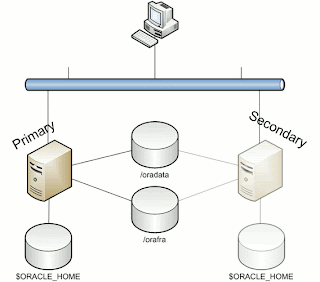
What I have done to make this work is set up 2 OCFS2 File Systems, one under /oradata and one under /orafra.
Next, install the Oracle RDBMS software on both machines, each using the same location for the Oracle Home and installing identical copies.

Once you have OCFS2 set up on your 2 servers, create or move your database onto /oradata, and make sure the DB_FILE_RECOVERY_DEST parameter points to /orafra and the DB_FILE_CREATION_DEST points to /oradata. Don't forget the DB_FILE_RECOVERY_DEST_SIZE parameter! Set it to a size equal to the file system where it is located, to make sure you will not run out of space too soon.

Your infrastructure will look like this (more or less):


/oradata is the location for you database, /orafra is for the Flash Recovery Area.

Now we can prepare the secondary machine to serve as Failover server.

To do this, take the following steps:

1. Copy the server parameter file and bring it to the secondary machine under $ORACLE_HOME/dbs. Edit this file and make adjustments to the following parameters:
CONTROL_FILES = /orafra/SID/controlfile/cp_cntrl.ctl
DB_FILE_RECOVERY_DEST = /oradata
DB_FILE_CREATE_DEST = /orafra
Optionally, you can create an spfile from this parameter file on the secondary machine.

2. Copy the /etc/oratab file to the secondary node

3. Create the necessary dump directories ($ORACLE_HOME/admin)

Now you are ready to go! Bring up your database on the primary machine and create a full backup as copy from your database:

allocate channel for maintenance type disk;
configure controlfile autobackup on;
configure default device type to disk;
run
{
RECOVER COPY OF DATABASE WITH TAG ‘IMG_COPY’ UNTIL TIME ‘SYSDATE – 1’;
BACKUP INCREMENTAL LEVEL 1 FOR RECOVER OF COPY WITH TAG ‘IMG_COPY’ DATABASE PLUS ARCHIVELOG DELETE INPUT;
copy current controlfile to ‘/orafra//controlfile/cp_cntrl.ctl’;
}

This script will do everything for you. See this post for an explanation of the script.

Now let's make some changes to the database and run the backup script again (NOTE: in order to have all changes you made to the database immediately reflected in the copy of your database, remove the UNTIL clause in the first line of the backup script).

What you can do now, is to simulate a crash of the database (there are a lot of ways to do this, I would recommend you just issue a shutdown abort at your first attempt).

Go to the second machine, log in as the oracle user, source your environment and perform the following steps to recover your database:

  1. start an rman session to the database (which is not started yet)
  2. mount the controlfile (located in /orafra/SID/controlfile, pointed to by the parameter file)
  3. issue "switch database to copy"
  4. issue "recover database"
  5. issue "alter database open resetlogs"

That is all it takes. Now your database is opened and available from the secondary machine. Now make sure that you reverse file locations in the backup scripts on the secondary machine to reflect the database file locations and the Flash Recovery Area. The database files should be located in /orafra, the flash recovery area should be located in /oradata. If you want to switch back, just use the backup script to create another backup as copy and switch back the way you did earlier. Make sure you have defined the correct file locations on the primary server, alike the secondary machine, to smoothen the switch.

Caveats

Like what is the case with any other regular backup, when you have made changes to the physical structure of your database (like adding datafiles, tablespaces, etc), an incremental backup needs to be taken immediately after, to prevent issues while recovering the database from the copy.

Another caveat is that it is necessary to have both database servers available in your tns alias being used to access the database. In such a case it is important to have load balancing set to off and failover set to on, having the primary as the first address.

Alternatives

If your server is still available, but the database has become corrupted, you can easily switch to the copy without the need for the secondary machine with a similar procedure as mentioned above. This way you will always have the choice of what to do.

Happy testing!

Wednesday, September 23, 2009

Oracle 11g Release 2 Clusterware New Feature: Policy-based Cluster and capacity management

I was reading through the Oracle 11g Release 2 Real Applications Cluster New Features List and stumbled upon this really cool new feature. I have to tell you about it, because this, imho, is one of the things that makes Oracle Clusterware a “Grid”.

So, what is Policy-based management? In order to answer that, you must first understand some basic changes in 11gR2. This is what the manual says:

With Oracle Clusterware 11g release 2 (11.2) and later, resources are contained in logical groups of servers called server pools. Resources are hosted on a shared infrastructure and are isolated with respect to their resource consumption by policies, behaving as if they were deployed in a single-system environment.

What does this mean? I have a bunch of resources and a bunch of servers (a grid) and subsets of these servers are combined in server pools. The resources are assigned to these server pools, but the server pool acts as if it were just one system. The isolation is done on a policy base. The whole idea is being able to limit the capacity that is assigned to a resource, and have a set of server pools to service those resources. BTW. It is possible to assign a server to multiple server pools.

This kind of management enables you to dynamically assign capacity to meet your policies and priorities, as well as to allocate (physical) resources by importance. Your critical applications will always have a minimum of resources at its disposal. It also gives you the opportunity to limit applications to use a set of servers.

How does it work? You just assign the minimum and maximum number of nodes to a resource, as well as the priority and Oracle Clusterware will do the rest.

The servers will get a number of attributes, like a name (basically the node name), the pools to which it belongs and the state it is in with some details.

How do Server Pools work? They are sets of servers, that service resources. What they will try to do is to spread the workload over the available servers in the pool. It is possible to limit a database to run in a specific server pool.

The top-level server pool is an exclusive server pool, which means that any given server can only be a part of one top-level server pool. It is impossible to be a member of multiple top-level server pools. This way, the grid or cluster is logically divided.

All servers that join the cluster/grid are automatically assigned to the Free Pool initially. This Free Pool is a server pool that is automatically created at installation. From here, servers can be assigned to other server pools. Another pool, the Generic Pool is also automatically generated, and all servers will be part of this pool too, in order to ensure compatibility with prior releases. Any pre-11gR2 database will need to run in this generic server pool.

The server pool is given an minimum and maximum number of nodes. As soon as the number of nodes decreases below the minimum value, Clusterware will automatically take necessary action and take servers from other pools to increase the number of servers to meet the required minimum number.

If this poses a problem for other server pools, decisions are made upon the importance of the pools. When importance is equal, it is only possible to take servers, if the number of servers is higher than the minimum value.

All of the above can be done completely dynamically, however, manual manipulation is still possible. You might think: "Where is my control?", but if you set it up carefully, it could save you a bundle. For example, when you configure Grid Plug and Play (another one of those new features), it is possible to have a database bring up a new instance in the server pool and automatically create new log threads, undo tablespaces, etc. Isn't that way cool?

Oracle 11g Release 2 - ADVM (ASM Dynamic Volume Manager)

One of the new features in Oracle 11g Release 2 is Automatic Storage Management Cluster File System. This file system provides concurrent access from multiple (clustered) nodes.

ACFS is provided through the Automatic Storage Management Dynamic Volume Manager. In order to have a file system, one needs a volume (be it physical or logical) to put it on. Oracle has developed a Dynamic Volume Manager (ADVM) that can provide these volumes from ASM Diskgroups. You can use ADVM to create volumes that are replicated within the ASM diskgroup mechanism – by means of normal or high redundancy. Multiple volumes can reside on one diskgroup. The ADVM provides a device driver interface to the ACFS client.

Due to the mirroring features of ASM, it is possible to have a mirrored file system (even across a stretched cluster, when your storage infrastructure allows for such an architecture) that will leverage the features of ASM to provide consistency over hardware failure and ASM instance crashes.

You can use the file systems provided through ADVM not only for database files, but also for regular files such as executables and log files. During creation of the file system you have the choice to designate the file system for Oracle Home functionality. By choosing this option, the file system is registered in the Cluster Registry as a managed resource, giving Oracle the opportunity to layer dependencies on this file system for the use of Oracle Homes.

Because of the fact that Oracle ADVM Volumes are technically spoken ASM files located on ASM Disk groups, and the fact that the Dynamic Volumes do not use the traditional device partitioning, it enables Oracle to extend some of the ASM features to the ASM Clustered File Systems, which are created inside these ADVM Volumes, such as dynamic resizing or dynamically adding volumes. This makes ADVM and ACFS a far more flexible solution than traditional physical devices.

Important Note: Oracle ADVM supports all storage solutions supported for Oracle ASM with the exception of NFS and Exadata storage. That will have to wait for some time still…


The above picture shows the User Interface, provided through the ASM Configuration Assistant (asmca), to create file systems inside ASM using the ADVM.

Wednesday, September 16, 2009

Oracle ACFS advanced topics

While everybody is exploring new features of the latest release of Oracle 11g, we're all very excited about all the new possibilities.
One of those new features is Oracle ACFS (ASM Cluster File System), wich provides an Oracle Home shared file system or a general purpose clustered file system on ASM storage. These are very nice features that will be used by many customers, in time to come. My first experiences are quite good. However, it is of great importance to know the limitations of those new features as well. Oracle has - on the topic of ACFS - thought about this very carefully, by adding an Appendix to the Storage Administrator's Guide, called ACFS Advanced Topics. Amongst these, a number of limitations are discussed. Well, one can argue whether these are actual limitations, that really limit you in operating ACFS, but it is good to know about these when planning for you Grid Infrastructure.

Oracle ACFS Disk Space Usage
Some Facts and Figures: Oracle ACFS supports:
  • 64 million files in a file system,
  • 63 snapshots,
  • 64 mounts on 32 bit systems,
  • 256 mounts on 64 bit systems.

Oracle allocates metadata for each node that mounts the file system, comprising approximately 64 – 128 MB per node. Also, some space is reserved for local bitmaps to reduce contention on the global bitmap in order to find free space. This can add up to 128MB per node. All of this space is reported as “in use” when querying the file system for disk space.

Oracle ACFS Error Handling
CAUTION: It is very important to unmount any file system that is using the Oracle ASM Dynamic Volume Manager (ADVM), before shutting down an Oracle ASM Instance. Failing to do so can result in I/O failures. One can never guarantee that the ASM instance(s) will never fail, but in case it does, volumes must be closed and opened again to be able to access them. Dismount the file systems that were mounted during failure and after the instance is restarted, mount the corresponding disk group with the volume enabled, after which you can mount the file system again.

Therefore, if any file systems are currently mounted on Oracle ADVM volume files, the SHUTDOWN ABORT command should not be used to terminate the Oracle ASM instance without first dismounting those file systems.

When a metadata write fails, regardless whether it be an ASM or storage failure, ACFS isolates the errors to a single file system and puts it in an off-line state. The only thing you can do with it is dismount. Other nodes (when available) recover the transaction, if it can write to that particular storage. After this, the file system can be mounted again.

When the file system being put offline is in use by processes or users, it might not be possible to unmount it. The administrator has to identify the processes that are claiming the file system and stop them before unmounting.

Oracle ACFS and NFS
Because block device major numbers of ADVM devices can be different after a reboot, the -fsid=# should be used when exporting NFS file systems. The option forces the clients to use this number (#) when communicating with this file system. Obviously, the number should be unique across the cluster. It replaces the number derived from the major/minor number of the device itself, since it can change with reboots.

Limits of Oracle ADVM
Some Facts: The default configuration for an Oracle ADVM volume is four columns of 64 MB extents in length and a 128 KB stripe width. Oracle ADVM writes data as 128 KB stripe chunks in round robin fashion to each column and fills a stripe set of four 64 MB extents with 2000 stripe chunks before moving to a second stripe set of four 64 MB extents for volumes greater than 256 megabytes. Note that setting the number of columns on an Oracle ADVM dynamic volume to 1 effectively turns off striping for the Oracle ADVM volume (are you still with me?;-)

On Linux platforms Oracle ASM Dynamic Volume Manager (Oracle ADVM) volume devices are created as block devices regardless of the configuration of the underlying storage in the Oracle ASM disk group. Do not use raw (8) to map Oracle ADVM volume block devices into raw volume devices.

Oracle ACFS and Oracle Restart
Oracle Restart does not support root-based Oracle ACFS resources for this release. As a result, the following operations are not automatically performed:
  • Loading Oracle ACFS drivers
  • Mounting Oracle ACFS file systems listed in the Oracle ACFS mount registry
  • Mounting resource-based Oracle ACFS database home file systems
The Oracle ACFS resources associated with these actions are not created for Oracle Restart configurations.
In short, the following resources are only supported for the Oracle Grid Infrastructure Cluster configurations, and are not supported for Oracle Restart Configurations:
  • The Oracle ACFS drivers resource (ora.drivers.acfs),
  • The Oracle ACFS registry resource (ora.registry.acfs)
  • The Oracle ACFS individual file system resource ora.diskgroup.volume.acfs)

Source: Oracle Database Storage Administrator's Guide, 11g Release 2, Appendix B