Wishing everybody out there a very merry Christmas and a prosperous 2010, full of learning and sharing!
Keep in Touch!
Arnoud
Thursday, December 24, 2009
Tuesday, December 22, 2009
Presenting @ UKOUG RAC & HA SIG meeting on Feb 10
On February 10, 2010, the UKOUG RAC & HA SIG will organize it's half-yearly SIG meeting.
I am very pleased to tell you that I have been invited to join this meeting and present about the recovery method I have been exploring lately (see this post, with all its referring posts).
The agenda is not yet fully confirmed, but there will be
Once the program is confirmed completely, I will post about it again.
The event will take place on Feb. 10 at the Customer Visitor Center at Oracle Thames Valley Park in Reading, UK.
Looking forward to an incredible day of learning and sharing.
I am very pleased to tell you that I have been invited to join this meeting and present about the recovery method I have been exploring lately (see this post, with all its referring posts).
The agenda is not yet fully confirmed, but there will be
- a forum discussion on the topic of using Grid and/or Real Applications Cluster for consolidation;
- Martin Bach (Oracle 10g Certified Master) will do a presentation.
- My presentation - Lightning fast recovery of (physically) corrupted databases without the need to restore the backup - or - To Restore Or Not?
Once the program is confirmed completely, I will post about it again.
The event will take place on Feb. 10 at the Customer Visitor Center at Oracle Thames Valley Park in Reading, UK.
Looking forward to an incredible day of learning and sharing.


E-Business Suite Release 12.1.2 available
Having been ill for a couple of days, I missed Steven Chan's announcement for Oracle E-Business Suite Release 12.1.2.
In an earlier post I already elaborated on the new Technology Features of this release.
I will get my 12.1.1 environment started up this weekend and see whether I can upgrade to 12.1.2 according to Metalink Note 845809.1.
Nice new feature: Oracle Database 11gR2 is certified with R12.1.2 (or should it be the other way around?)!
I will keep you updated on my progress.
In an earlier post I already elaborated on the new Technology Features of this release.
I will get my 12.1.1 environment started up this weekend and see whether I can upgrade to 12.1.2 according to Metalink Note 845809.1.
Nice new feature: Oracle Database 11gR2 is certified with R12.1.2 (or should it be the other way around?)!
I will keep you updated on my progress.
Wednesday, December 9, 2009
E-Business Suite R12: Shared Application Tier File System
In Oracle E-Business Suite Release 12, one of the eye-catching new features was the Instance Home, or $INST_TOP. The result of this Instance Home is that you can now share the APPL_TOP between multiple installations of Oracle E-Business Suite.
I have seen a number of articles and discussions on the Internet discussing the reasons why one would want to share the APPL_TOP between E-Business Suites.
Why share?
Personally, I didn't see any reason why I would want this, other than to see it work and be able to use the feature, when time would come that I would need it.
I cannot remember where anymore, but I saw a reason lately that actually made sense to me:
As a DBA, it could be of use when I would want to replay issues that have been reported to me, being sure that I would be using the exact same APPL_TOP. I could set up a separate E-Business Suite, sharing the APPL_TOP, but having my own database. Now I can play around with my own E-Business Suite, without making changes to the production data, but I am still using the very same code as in the production environment. To make sure I do not break anything, I could even mount the APPL_TOP read only.
Recently I found another reason why it could be interesting to share the APPL_TOP: When your production environment consists of multiple E-Business Suites. I heard about Oracle's recommendations to separate Advanced Supply Chain Planning from your OLTP E-Business Suite environment. You would have to maintain two E-Business Suites, and I can see a couple of reasons why you would want to have identical code versions on each of them. In order to keep the two (or any number of) environments synchronous, you might want to implement the shared APPL_TOP.
Share what? APPL_TOP vs. Application Tier File System
By the way, can "shared APPL_TOP" also be read as "Shared Application Tier File System"? I have taken up the habit of asking whether APPL_TOP means Application Tier File System, or it just reflects the $APPL_TOP directory with all its subdirectories. It happens to be that the two are not the same, even though many of us use the two simultaneously.
In my opinion (but that may be because my experience goes back to the days these technologies were introduced), the APPL_TOP is just the ($)APPL_TOP: the top level directory that contains the product tops (/whatever_directory/apps/apps_st/appl).
The Application Tier File System is more than just the APPL_TOP. It contains the whole set of code that makes the Application Tier, i.e. the APPL_TOP, COMMON_TOP, but also the 10.1.2 and 10.1.3 ORACLE_HOMEs that reside under /whatever_directory/apps/tech_st. To conclude: The Application Tier File System is everything that resides under /whatever_directory/apps. That is a whole lot more.
But hang on? The question now is what Oracle means by stating that the APPL_TOP can be shared among multiple E-Business Suite environments. Do they mean just the APPL_TOP, or the Application Tier File System?
The official answer can be found in Metalink Note 384248.1, Appendix B where you can read that it is possible to share the complete Application Tier File System among multiple unshared E-Business Suite Databases.
I have seen a number of articles and discussions on the Internet discussing the reasons why one would want to share the APPL_TOP between E-Business Suites.
Why share?
Personally, I didn't see any reason why I would want this, other than to see it work and be able to use the feature, when time would come that I would need it.
I cannot remember where anymore, but I saw a reason lately that actually made sense to me:
As a DBA, it could be of use when I would want to replay issues that have been reported to me, being sure that I would be using the exact same APPL_TOP. I could set up a separate E-Business Suite, sharing the APPL_TOP, but having my own database. Now I can play around with my own E-Business Suite, without making changes to the production data, but I am still using the very same code as in the production environment. To make sure I do not break anything, I could even mount the APPL_TOP read only.
Recently I found another reason why it could be interesting to share the APPL_TOP: When your production environment consists of multiple E-Business Suites. I heard about Oracle's recommendations to separate Advanced Supply Chain Planning from your OLTP E-Business Suite environment. You would have to maintain two E-Business Suites, and I can see a couple of reasons why you would want to have identical code versions on each of them. In order to keep the two (or any number of) environments synchronous, you might want to implement the shared APPL_TOP.
Share what? APPL_TOP vs. Application Tier File System
By the way, can "shared APPL_TOP" also be read as "Shared Application Tier File System"? I have taken up the habit of asking whether APPL_TOP means Application Tier File System, or it just reflects the $APPL_TOP directory with all its subdirectories. It happens to be that the two are not the same, even though many of us use the two simultaneously.
In my opinion (but that may be because my experience goes back to the days these technologies were introduced), the APPL_TOP is just the ($)APPL_TOP: the top level directory that contains the product tops (/whatever_directory/apps/apps_st/appl).
The Application Tier File System is more than just the APPL_TOP. It contains the whole set of code that makes the Application Tier, i.e. the APPL_TOP, COMMON_TOP, but also the 10.1.2 and 10.1.3 ORACLE_HOMEs that reside under /whatever_directory/apps/tech_st. To conclude: The Application Tier File System is everything that resides under /whatever_directory/apps. That is a whole lot more.
But hang on? The question now is what Oracle means by stating that the APPL_TOP can be shared among multiple E-Business Suite environments. Do they mean just the APPL_TOP, or the Application Tier File System?
The official answer can be found in Metalink Note 384248.1, Appendix B where you can read that it is possible to share the complete Application Tier File System among multiple unshared E-Business Suite Databases.
Wednesday, November 4, 2009
"...Coolest Recovery Demo Ever..."
Yesterday, I got the chance to perform a presentation at the Dutch Oracle User Group (OGh) DBA day about a topic that I have blogged about a couple of days ago: Database Crash Recovery : To Restore Or Not Restore.
I proved my "theory" with a live demo. In VMware I crashed my database after having it backed up, after which I was able to recover within 5 minutes, without restoring the backup. All changes were kept, even the changes after the last incremental backup was taken... (I admit, I was impressed myself, too!:-)
The presentation went well, and today I received some comments from some of the attendees, telling me that the presentation was received extremely well. One of the attendees even twittered about "the coolest recovery demo ever".
For anyone interested in the solution/approach: The concepts of this approach are outlined in this and this article, founde elsewhere on my weblog.
Happy reading and testing!
I proved my "theory" with a live demo. In VMware I crashed my database after having it backed up, after which I was able to recover within 5 minutes, without restoring the backup. All changes were kept, even the changes after the last incremental backup was taken... (I admit, I was impressed myself, too!:-)
The presentation went well, and today I received some comments from some of the attendees, telling me that the presentation was received extremely well. One of the attendees even twittered about "the coolest recovery demo ever".
For anyone interested in the solution/approach: The concepts of this approach are outlined in this and this article, founde elsewhere on my weblog.
Happy reading and testing!
Wednesday, October 28, 2009
Oracle E-Business Suite Release 12.1.2 - New Features
Wondering what the next release of E-Business Suite R12 will contain? Steven Chan posted a weblog about the availability of the 12.1.2 RCD yesterday, way before R12.1.2 is made available (the release date is not yet known).
However, it is always interesting to see what the next upcoming release will contain. I will stick to the Applications Technology, because that is my part of the pond:
Technology Highlights
However, it is always interesting to see what the next upcoming release will contain. I will stick to the Applications Technology, because that is my part of the pond:
Technology Highlights
- The most eye-catching new feature is support for 11gR2 database. Unfortunately (in a way) 11gR2 will not be shipped with 12.1.2. It'll still come with 11.1.0.7.
- On the middle-tier, support is introduced for AS 10gR3 (10.1.3.5) which will be shipped with the release, JDeveloper 10.1.3 and it uses the Sun Java Plug-in version 6.
- The Application Server for Forms and Reports will be 10.1.2.3. The maintenance pack will either include or require customers to upgrade to this version.
- Of all externally installed Oracle technology (WebCenter, Discoverer, Portal, Internet Directory, SSO, BPEL PM, OBIEE, OEM, etc) the most recent version will be certified with 12.1.2.
Internationalization Highlights
- Added support for Lithuanian, Indonesian and Ukrainian languages.
- Space and single quote number group separators
- First day of the week support (choose whichever day is the first day of the week)
- The Gantt chart and inline date picker features support Thai and Hijrah calendars
Oracle Applications Framework Highlights
- Redesigned Home Page
new folder-like structure, better spacing, favorites are now in a pull-down menu. In general the home page is more compact and allows for easy extension and custom content. - New Navigator Menu and favorites Pull-Down menue in the Global Header area
The Navigator Menu now appears in every OAF page (Pull-down menu). Favorites menu is also a pull down menu from the Global Header area and allows for marking the current page as favorite. - Look-ahead capability in lists of values
When entering a limited number of characters in a field, an inline window will let you select from a list of values based on the characters you typed. This way, you can limit the number of values in the inline window and ease your search for the correct value. - ability to add, view, edit and delete attachments inline
Inline attachments now have a hover-over interaction allowing users to view, add, edit and delete attachments to an entity. This capability eliminates the need to go to the Add and View attachments pages to maintain attachments. - pop-up component
This allows applications to display a pop-up window on top of an OAF page. - Portlet Generator
For static conversion of a standalone OAF region into a portlet. These can be embedded in any portal application or WebCenter. - A new component: rich container that can hold OBIEE content.
Through personalization, users can configure this component to hold a certain OBIEE report that accepts specific parameters.
Oracle Application Object Library Highlights
- Oracle Access Manager integration support
OAM can be used in stead of Oracle Single Sign On for thos applications or products that support it, but it can also be used together with OSSO to provide centralized authentication. - AOL Java APIs
Support for Oracle E-Business Suite Release 12.1.2 is provided - Scheduling Charts UI Enhancements
Dragging task numbers into the scheduling chart to create new tasks and shifts on the fly. Simplified ability for creating, assigning, searching and displaying new task assignments from a single source.
Diagnostics Framework
- Added support for XML file type diagnostics.
Integrated SOA Gateway
- SAML Token Support
E-Business Suite environments can trust external systems. These external systems can use a public key to authenticate a SOAP request using SAML. - Enhanced SOA Diagnostics
To check the health of the EBS Integrated SOA Gateway. - New interface type: Java APIs for Forms
these are XML document based interfaces, wrapped in Java classes to execute logic in Oracle Forms. Integrated in the Oracle Integration Repository (iRep) - Integrated SOA Gateway Customization
Support for custom integration interfaces, that can be deployed as custom Web Services. Customization feature is provided through the Integration Repository Parser.
Web ADI Highlights
- Introducing the Web Applications Desktop Integrator Extension Framework
wizard-based UI to create and manage desktop integrator solutions, providing a user-friendly approach to create custom integrators, without having to know the complexity of the EBS Schema.
Conclusion
My personal curiosity is focused on 11gR2 (I would be really interested in seeing the E-Business Suite running on 11gR2 Grid Infrastructure!). For sure there is enough to lookout for. Again, I am eagerly awaiting this new release.
Tuesday, October 27, 2009
using the RMAN backup as copy as base for Disaster Recovery
In an earlier post I have elaborated on the advantages the backup as copy feature offers to quickly recover from a damaged database.
In this article I will try to show how this advantage goes even further by adding another server to the infrastructure, introducing some kind of Disaster Recovery solution. OK, it is not fully featured like Oracle Dataguard, but it works and can be the first step towards Disaster Recovery. No need for a standby database, redo log shipping etc. It is all plain simple and straight-forward.
Shopping list:
- 2 servers, not necessarily equal in specifications, but having identical Operating Systems
- Clustered File System (OCFS2 will suffice, even NFS will do the job)
Preparations
First of all, you need to set up OCFS. Tons of information out there on the Internet to get your OCFS working. It is not difficult, See this PDF for information.
What I have done to make this work is set up 2 OCFS2 File Systems, one under /oradata and one under /orafra.
Next, install the Oracle RDBMS software on both machines, each using the same location for the Oracle Home and installing identical copies.
What I have done to make this work is set up 2 OCFS2 File Systems, one under /oradata and one under /orafra.
Next, install the Oracle RDBMS software on both machines, each using the same location for the Oracle Home and installing identical copies.
Once you have OCFS2 set up on your 2 servers, create or move your database onto /oradata, and make sure the DB_FILE_RECOVERY_DEST parameter points to /orafra and the DB_FILE_CREATION_DEST points to /oradata. Don't forget the DB_FILE_RECOVERY_DEST_SIZE parameter! Set it to a size equal to the file system where it is located, to make sure you will not run out of space too soon.
Your infrastructure will look like this (more or less):
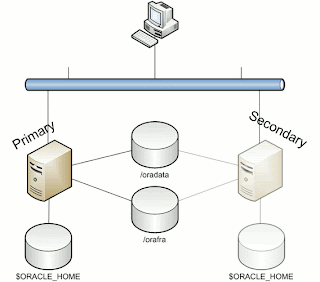
/oradata is the location for you database, /orafra is for the Flash Recovery Area.
Now we can prepare the secondary machine to serve as Failover server.
To do this, take the following steps:
1. Copy the server parameter file and bring it to the secondary machine under $ORACLE_HOME/dbs. Edit this file and make adjustments to the following parameters:
CONTROL_FILES = /orafra/SID
DB_FILE_RECOVERY_DEST = /oradata
DB_FILE_CREATE_DEST = /orafra
Optionally, you can create an spfile from this parameter file on the secondary machine.
2. Copy the /etc/oratab file to the secondary node
3. Create the necessary dump directories ($ORACLE_HOME/admin)
Now you are ready to go! Bring up your database on the primary machine and create a full backup as copy from your database:
allocate channel for maintenance type disk;
configure controlfile autobackup on;
configure default device type to disk;
run
{
RECOVER COPY OF DATABASE WITH TAG ‘IMG_COPY’ UNTIL TIME ‘SYSDATE – 1’;
BACKUP INCREMENTAL LEVEL 1 FOR RECOVER OF COPY WITH TAG ‘IMG_COPY’ DATABASE PLUS ARCHIVELOG DELETE INPUT;
copy current controlfile to ‘/orafra/
}
This script will do everything for you. See this post for an explanation of the script.
Now let's make some changes to the database and run the backup script again (NOTE: in order to have all changes you made to the database immediately reflected in the copy of your database, remove the UNTIL clause in the first line of the backup script).
What you can do now, is to simulate a crash of the database (there are a lot of ways to do this, I would recommend you just issue a shutdown abort at your first attempt).
Go to the second machine, log in as the oracle user, source your environment and perform the following steps to recover your database:
- start an rman session to the database (which is not started yet)
- mount the controlfile (located in /orafra/SID/controlfile, pointed to by the parameter file)
- issue "switch database to copy"
- issue "recover database"
- issue "alter database open resetlogs"
That is all it takes. Now your database is opened and available from the secondary machine. Now make sure that you reverse file locations in the backup scripts on the secondary machine to reflect the database file locations and the Flash Recovery Area. The database files should be located in /orafra, the flash recovery area should be located in /oradata. If you want to switch back, just use the backup script to create another backup as copy and switch back the way you did earlier. Make sure you have defined the correct file locations on the primary server, alike the secondary machine, to smoothen the switch.
Caveats
Like what is the case with any other regular backup, when you have made changes to the physical structure of your database (like adding datafiles, tablespaces, etc), an incremental backup needs to be taken immediately after, to prevent issues while recovering the database from the copy.
Another caveat is that it is necessary to have both database servers available in your tns alias being used to access the database. In such a case it is important to have load balancing set to off and failover set to on, having the primary as the first address.
Alternatives
If your server is still available, but the database has become corrupted, you can easily switch to the copy without the need for the secondary machine with a similar procedure as mentioned above. This way you will always have the choice of what to do.
Happy testing!
Subscribe to:
Posts (Atom)


